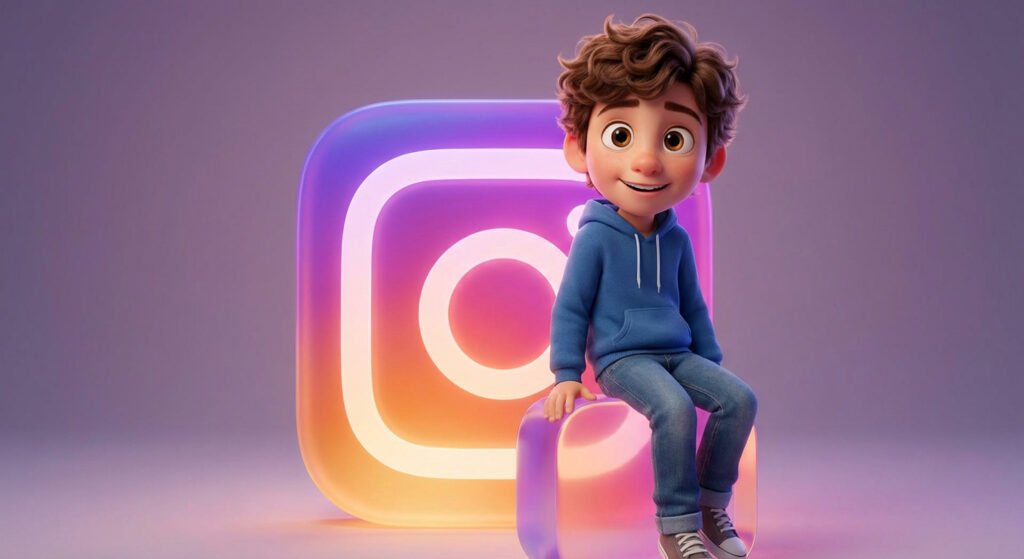
Have you seen those adorable 3D characters all over social media lately? Most of them are created using a specific “Pixar-style” framework. Whether you want to create a mascot for your brand or a cute 3D avatar of yourself, this prompt is the secret sauce.
Today, we are diving into the world of 3D Animation aesthetics using Gemini AI and Midjourney.
Why This Prompt Goes Viral
Social media platforms love vibrant, high-contrast images. The “Disney/Pixar” look works because of its expressive characters and soft, studio lighting. It’s friendly, eye-catching, and looks incredibly professional.
🧸 The Result
⌨️ The Prompt
Copy and paste this into your AI tool (don’t forget to customize the name…!):
A cute 3D character in Disney Pixar style, a young [Boy/Girl] with expressive eyes, wearing casual [Your Choice of Clothes], sitting on a giant glowing 3D logo of [Instagram/Facebook/Your Name], cinematic studio lighting, vibrant colors, 8k resolution, rendered in Octane, high detail skin and hair texture, cheerful atmosphere --v 6.0
🛠️ How to Customize This Prompt
This is where the fun starts! You can make this prompt viral by personalizing it:
- The Persona: Change “[Boy/Girl]” to “[Doctor/Gamer/Chef]” to match a specific profession.
- The Interaction: Make the character hold a smartphone, a cat, or even a slice of pizza.
- The Background: You can ask the AI to put the character in a “cozy bedroom” or a “futuristic city.”
Best Results on Gemini
For Gemini AI, try to be very descriptive about the textures. Use words like “soft fur,” “knitted sweater,” or “shiny plastic” to get that premium 3D render feel.
💡 Pro Tip for Social Media
If you want to use this for a profile picture, make sure to use a Square aspect ratio (1:1). This ensures the character is perfectly centered for Instagram or TikTok.